Reason. Decide. Build.

Dus leads. You decide.

Duscode is your engineering team. It builds your software, runs it on your servers and keeps it healthy. You approve what matters.

Proof on every taskAny AI providermacOS · Linux · Windows (WSL 2)

The real Duscode workspace, shown with a sample project and session.

Dus does the engineering. He plans, builds, tests, ships and watches your software, and explains every decision in plain words. You approve what matters: money, publishing, and anything that can’t be undone.

The job

One team, six duties.

Dus covers the whole job for a project, from the first line of code to keeping it running. Each duty ends in something you can check: a passing test, a merged change, a live address, a resolved incident.

Build

Builds what you describe

Plans the work, writes the code in your project’s own framework, and runs your tests. Every task ends with a Proof of Work: what ran, what passed, what’s left.

Ship

Ships it safely

Commits, opens the pull request and checks each change with Local CI on your own computer before it merges. No hosted CI bill.

Host

Runs it on your servers

Puts your app on your own server or host, checks it’s healthy, and keeps a one-step rollback. The first deploy is always your call.

Watch

Keeps an eye on it

Checks your live systems, notices when something breaks, fixes what you’ve allowed and asks about the rest. It runs on your computer today; watching while it’s switched off is coming soon

Maintain

Does the routine work

Runs jobs on a schedule you set: checks, reports and clean-ups, each with its own budget and a record of what it did.

Fix

Fixes what breaks

When a check fails or someone reports a problem, Dus finds the cause, proves it with a test, fixes it and shows you the evidence.

Dus asks before anything that costs money, goes public or can’t be undone, and tells you plainly when something didn’t work. He doesn’t replace your judgement; he saves you the legwork.

Cost routing

The right model for every task, and the receipt.

Auto starts every task on the cheapest model that can do it, and moves up a tier only when your checks still fail after a fix, Dus gets stuck or the model refuses. Or pin a model, and its effort, from the top bar. Project details shows what each session cost and saved.

Tiers
fast · standard · frontier
Escalation
On failed checks, repeated failure or refusal; never down
Savings
Measured per task against the top model
Providers
Anthropic, OpenAI, Gemini, DeepSeek, local, any OpenAI-compatible
Routing
Rename a prop across three files
checks passed
fast
Dark mode toggle with a test
checks passed
fast
Fix a race in the job queue
checks failed after a fix
fast → standard
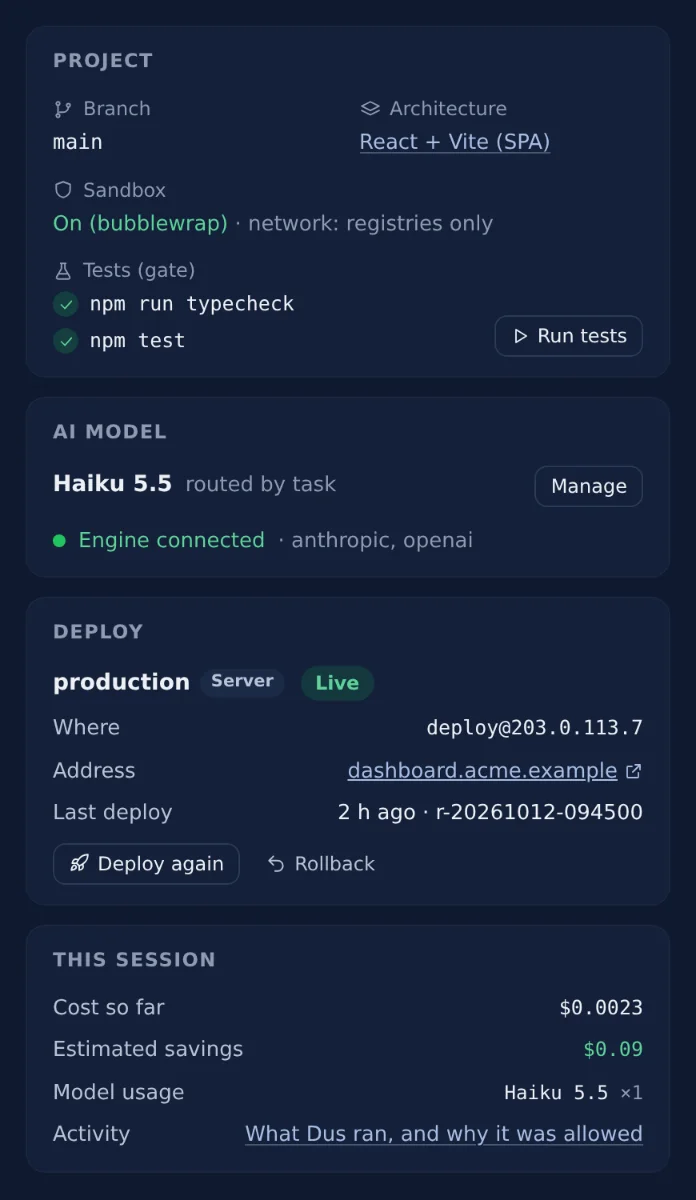
Duscode's Project details: the test gate with both checks passed and Run tests, the model that answered (Haiku 5.5, routed by task), the live deploy with Deploy again and Rollback, and this session's cost so far, estimated savings and model usage.
Verification gates

Done means your tests pass.

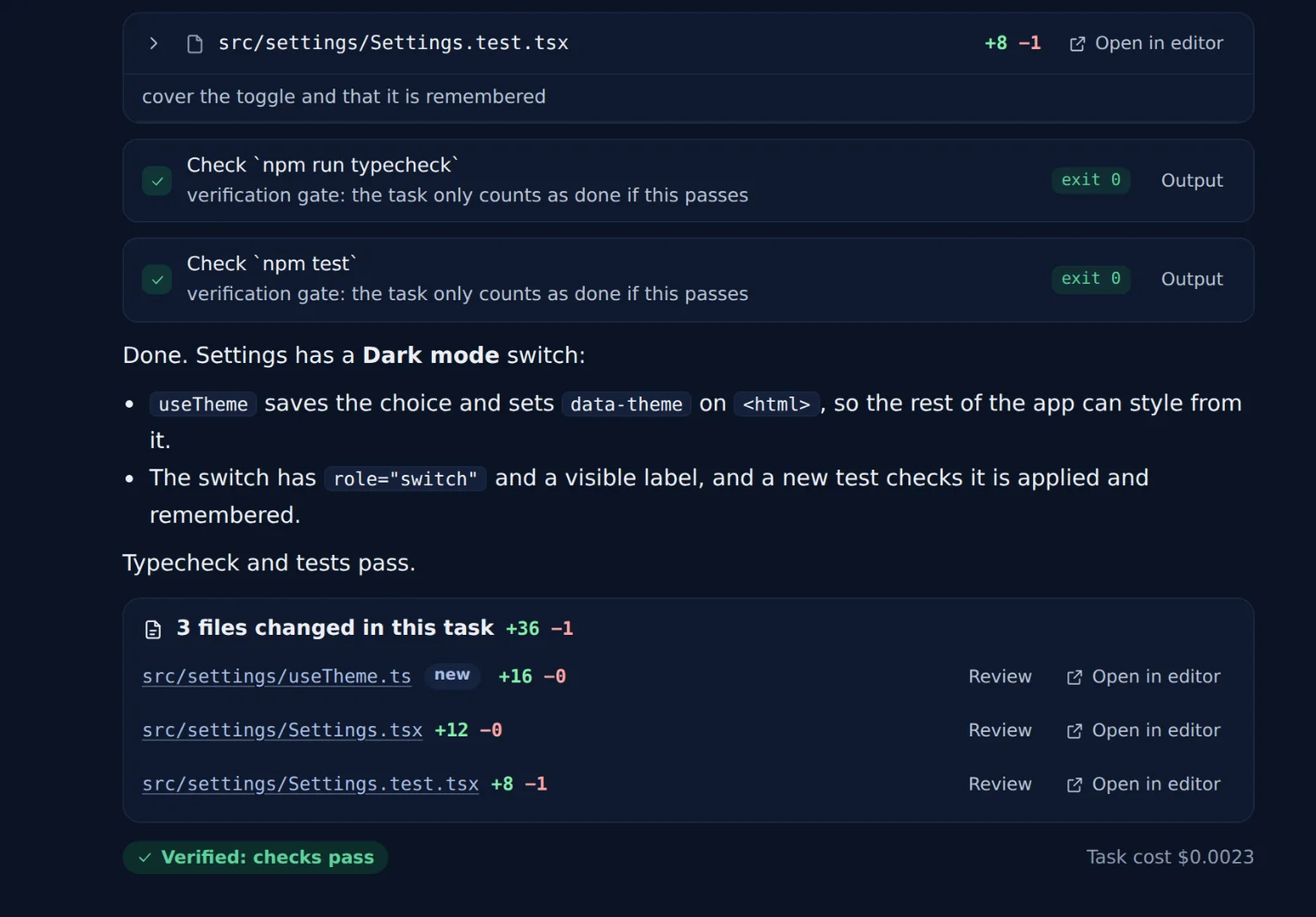
After any task that changes files, Duscode runs your project's own typecheck, lint and tests. Failures go back to Dus to fix; a repeated failure moves the task to a stronger model. Every task ends verified or not verified.

Checks
Detected from the project, or configured
On failure
Output goes back to Dus, then escalates
Plan
On every plan, including Free
The end of a task in Duscode: 'Check npm run typecheck' and 'Check npm test' both exit 0, Dus summarises the change, three changed files are listed with line counts, and a badge reads 'Verified: checks pass'.
Parallel sessions

Many tasks at once, each on its own branch.

An isolated session gets its own git worktree inside your repo, its own duscode/ branch and its own dev server, so its preview link hot-reloads as Dus edits. Nothing is force-pushed, reset or stashed; a finished session keeps its branch.

Isolation
.worktrees/<name> on duscode/<name>
Previews
One port per session, from 5100
Merge
Your checks run first; conflicts are reported, never auto-resolved
Sessions · acme-dashboard
Main
main
project folder
Fix chart tooltip
duscode/fix-chart-tooltip
:5100
CSV export
duscode/csv-export
:5110
Migrate order statuses
duscode/order-events
:5120
Each preview runs the project's own dev server in that session's worktree.
Browser testing

Dus tests in a real browser.

Your app runs in the Preview tab, beside the chat. When Dus tests it, you watch every step live: the pointer, what it clicks, what it types and whether each check passed. It reads console errors and failed requests and looks at the screenshot, including against a design you attach.

Preview
Your running app at desktop, tablet or phone width
Live view
Pointer, step captions and pass or fail, as it happens
localhost:5100/settings
Steering and push-back

Redirect it mid-task. It tells you when you're wrong.

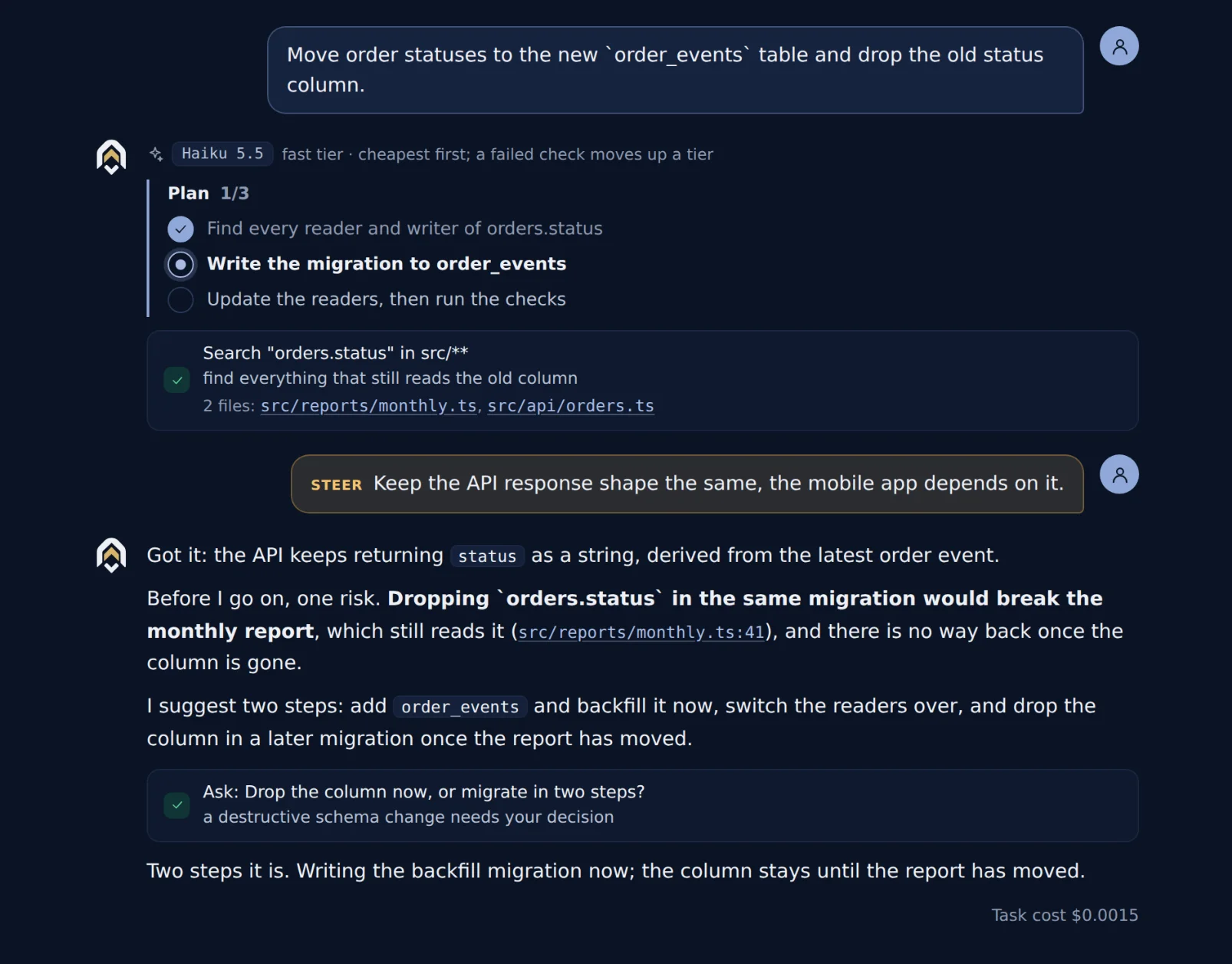
Send a message any time, even while Dus works. It reads it at the next step and decides: a correction changes the current work now; a new request is queued for after this task. When a direction would break something, Dus explains the consequence and asks, with options and a recommendation. You decide.

Steering
Read at the next step, no restart
New requests
Queued for after the current task
Decisions
2–4 options, one recommended, or your own words
A Duscode session: the user steers 'Keep the API response shape the same', and Dus warns that dropping a column in the same migration would break the monthly report, suggests two steps, and asks which to do.
Architectures

One structure, followed by every agent.

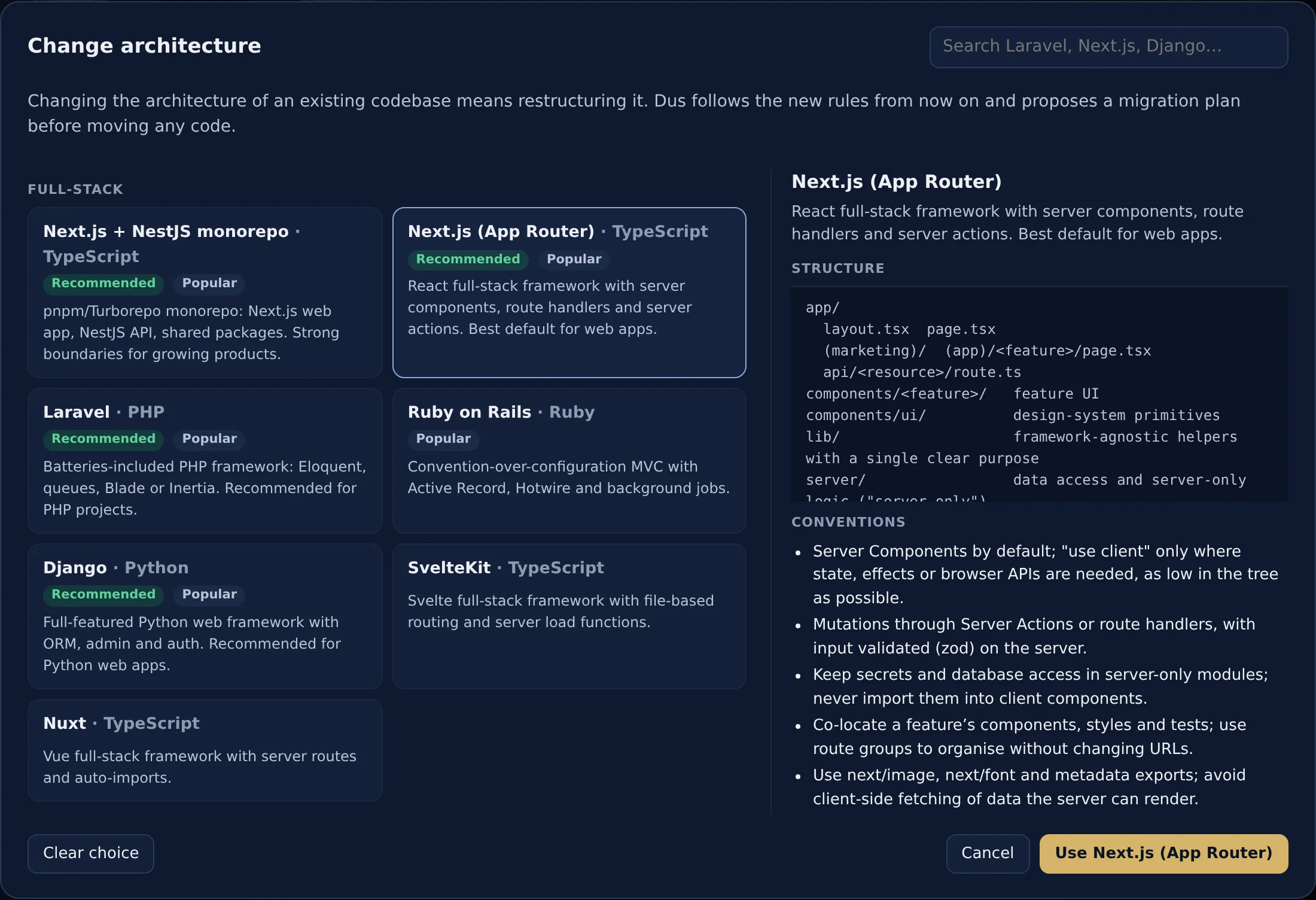
Pick a blueprint when a project starts: Laravel, Next.js, NestJS, Django, Rails, React + Vite and more. Its structure, conventions and testing rules go into every task, on any model, so the codebase doesn't drift. Changing it later starts with a migration plan.

Blueprints
24 built in, detected from the repo
Scaffolding
New projects start from the stack's official starter
Changing a project's architecture in Duscode: blueprints such as Next.js + NestJS monorepo, Next.js, Laravel, Ruby on Rails, Django and SvelteKit, with Next.js (App Router) selected showing its folder structure and conventions, and a note that Dus proposes a migration plan before moving any code.
Secrets vault

Credentials the AI uses but never sees.

Deploy keys, database URLs and tokens, referred to by name. Duscode puts the value into the one command that needs it and redacts it from every output, log, journal and session file. Values never reach a model provider and are never synced to Duscode Cloud.

Storage
AES-256-GCM, key in the OS keychain
Audit
Which session used which secret, and when
Where
Settings → Vault
Settings · Vault
DATABASE_URL
••••••••••••
this project
GITHUB_TOKEN
••••••••••••
global
DEPLOY_SSH_KEY
••••••••••••
this project
fix-chart-tooltip used DATABASE_URL in npm run migrate

From idea to merged, in three moves.

Dus does the legwork. Every decision that changes your code or your branch stays with you.

01

Open a project

Run duscode in any folder or start a new one. Pick its architecture once; Dus reads the repo and your project instructions.

02

Describe the task

Type it or paste a screenshot. Dus plans, picks a model, edits and runs commands, asking first, and checks the result against your tests.

03

Review and merge

Read the diffs, commit with a suggested message, push, open a pull request or merge the session's branch after your checks pass.

What you can count on.

Seven things Duscode is built around, so you can hand Dus real work.

Builder mode

For founders who ship products themselves.

Dus makes the technical calls; you make the owner's. A reviewer checks each one, and every change can be undone. You're asked about money, publishing and product choices, in plain words, with a recommendation. Coming soon

Any model

From any provider, on credits or your own keys.

Each task gets the model that suits it. Switch providers any time. If one is busy or down, the call can move to another provider you've set up.

Proof of Work

Every claim backed by evidence.

One record per task, built only from what ran. Commands, checks and exit codes, the diff, screenshots and cost. What the model says about its own work doesn't count as proof.

Honest completion

Done means your checks pass.

Each requirement is checked before Dus finishes. Your own typecheck, lint and tests run first. When a request can't be met, Dus says "Not done" and why.

Credits that never surprise you

Shown in pounds, capped by you.

Every task shows its cost. Budgets stop the work at your limit. You hear at 80% used, and when credits run out, Dus pauses and asks. Auto top-up stays off unless you turn it on.

Sessions that never forget

Full history, kept until you delete it.

Dus can recall any earlier detail of a session. Every message and step is saved on your machine, and you can rewind to before any message.

Safety

Sandbox, vault and approvals.

Commands run in an operating-system sandbox. Secrets are used by name and never reach a model. Each approval says why in one sentence, and a fixed blocklist holds even with auto-approve on.

AI usage included, shown in pounds.

Pro, Max and Team include AI usage every month, and Dus routes each task to the cheapest model that can do it, so it goes further. Or bring your own provider keys for less.

Free

£0

£1 of usage, once

Get early access

Bring your own key

£8/ month

Your keys, your provider bills

Get early access

Pro recommended

£20/ month

£14 of usage each month

Get early access

Max

£100/ month

£80 of usage each month

Get early access

Team

£30/ seat / month

£20 of usage per seat, pooled

Talk to us

Prices exclude VAT. Launch prices, which may change as we learn from early users. Top up from £10 when you need more.

Questions.

What is Dus?

Dus is the reasoning engine inside Duscode: it plans, builds, tests and improves software, and explains its decisions. Dus reasons and proposes; you approve, steer and merge. That's the promise: intelligent autonomy with human oversight.

The name is inspired by the Dutch word dus, "thus, so, therefore", which we read as reasoning that leads to action.

What does "bring your own key" mean?

You use an API key from your AI provider, such as Anthropic or OpenAI. Duscode calls the provider directly from your machine with that key, and the provider bills you at its own prices. Duscode adds no markup to that and never sees your bill. On Pro, Max and Team you don't need a key: usage comes with the plan.

Which models can I use?

Duscode ships with presets for Anthropic, OpenAI, Gemini, DeepSeek, xAI, Mistral, Groq, OpenRouter, Together, Fireworks, Cerebras, Moonshot and Qwen, plus local models through Ollama or LM Studio and any OpenAI-compatible endpoint you configure. Routing chooses among the ones you have keys for.

Does my code leave my machine?

Only in the requests Dus makes to an AI model. With your own key, they go straight to the provider you choose. On Duscode credits, they pass through Duscode Cloud on the way, and we keep what each call cost, not what it said. Your keys go only to the provider they belong to. The provider's data policy applies; see Security.

Does it work on Windows?

Yes, through WSL 2. Duscode runs inside your Linux distribution, because Dus uses git worktrees and runs shell commands, and you use it from your Windows browser or VS Code. See the install steps.

Is there a free plan?

Yes. Free costs nothing and keeps the verification gates and budgets, because they protect your code and your money. Pro adds automatic routing, helper agents, the savings dashboard and the VS Code extension.